RV Tech & Tips
In the Starlink & Remote Work From the Road hub.
Starlink Power Consumption: Watts Per Hour in an RV
Some links below are affiliate or referral links, if you buy through one I may earn a small commission at no extra cost to you. I only recommend gear I actually use, see my full kit on the My RV Setup page. Full disclosure.
Short answer: a standard Starlink dish and router draw roughly 50 to 75 watts in normal use, about 20 watts idle, and the newer Standard 4 and 4X hardware runs closer to 75 to 100 watts active. SpaceX's newest V5 dish, released in July 2026, cuts that further, rated around 35 to 50 watts active, roughly half the Standard 4/4X draw, though Starlink hasn't published an idle figure for it yet. The Mini draws less than any of them, commonly cited in the 20 to 40 watt range, which is one of its main advantages for smaller battery setups. High Performance dishes run heavier, up in the 110 to 150 watt range. Over a full day of continuous use, the standard dish works out to somewhere around 1 to 1.5 kilowatt-hours, depending on your model and how much the dish has to work.
| Dish | Idle | Active |
|---|---|---|
| Standard (Actuated) | ~20W | 50-75W |
| Standard 4 / 4X | ~20W | 75-100W |
| Standard V5 (2026) | not yet published | 35-50W |
| Mini | ~10-15W | 20-40W |
| High Performance | ~30-40W | 110-150W |
Idle isn't a fixed number either. The dish never fully sleeps unless you power it off, since it's holding its satellite connection and staying ready to serve traffic, so "idle" here means connected with no real data moving, not powered down. Cold weather and snow-melt mode push every one of these numbers higher, since the dish has a heating function that kicks in to clear snow and ice off the surface, and that heater draws meaningfully more power than normal operation. If you're running Starlink through a winter boondocking stretch, budget extra runtime for exactly that reason. It's not a constant draw, it cycles on when the dish detects it needs to melt something off, but it's real enough that I plan a bigger buffer into my own setup once temperatures drop.
Quick disclosure: some of the links below are affiliate links. If you buy or book through one, I may earn a small commission at no extra cost to you.
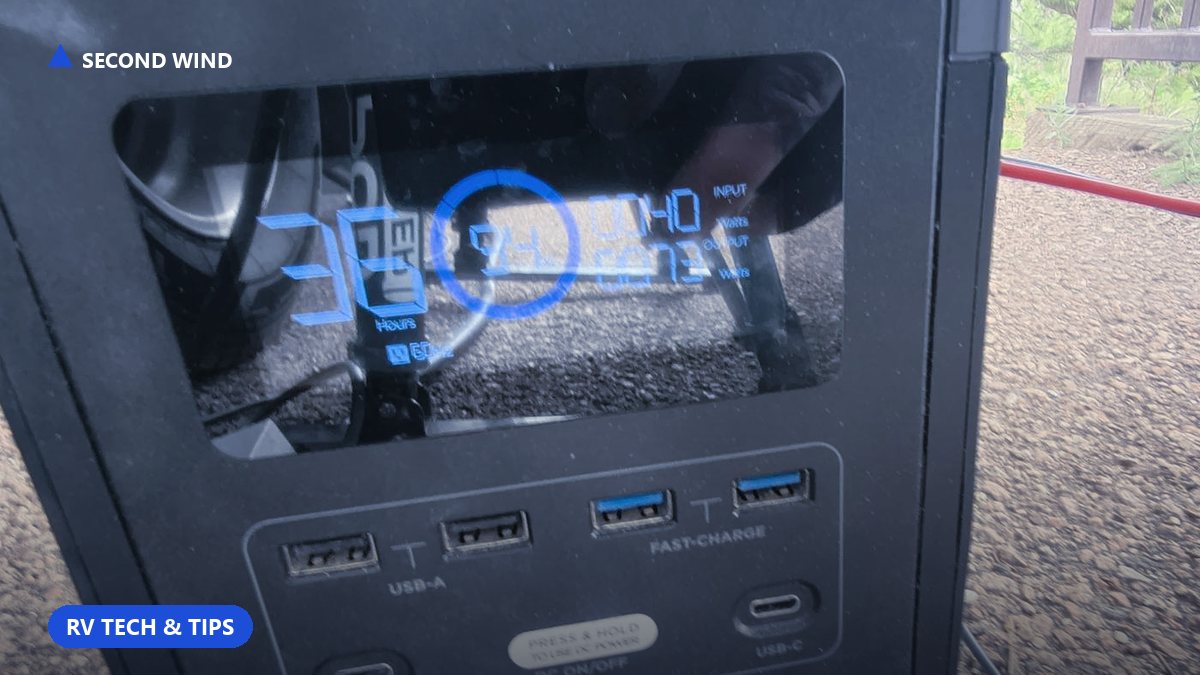
Those baseline numbers come from EcoFlow's published Starlink power breakdown and independently confirmed by Jackery's own numbers, worth checking against your own hardware generation since Starlink has shipped several dish revisions. Here's what it looks like on my own gear, running the standard dish off a portable power station.
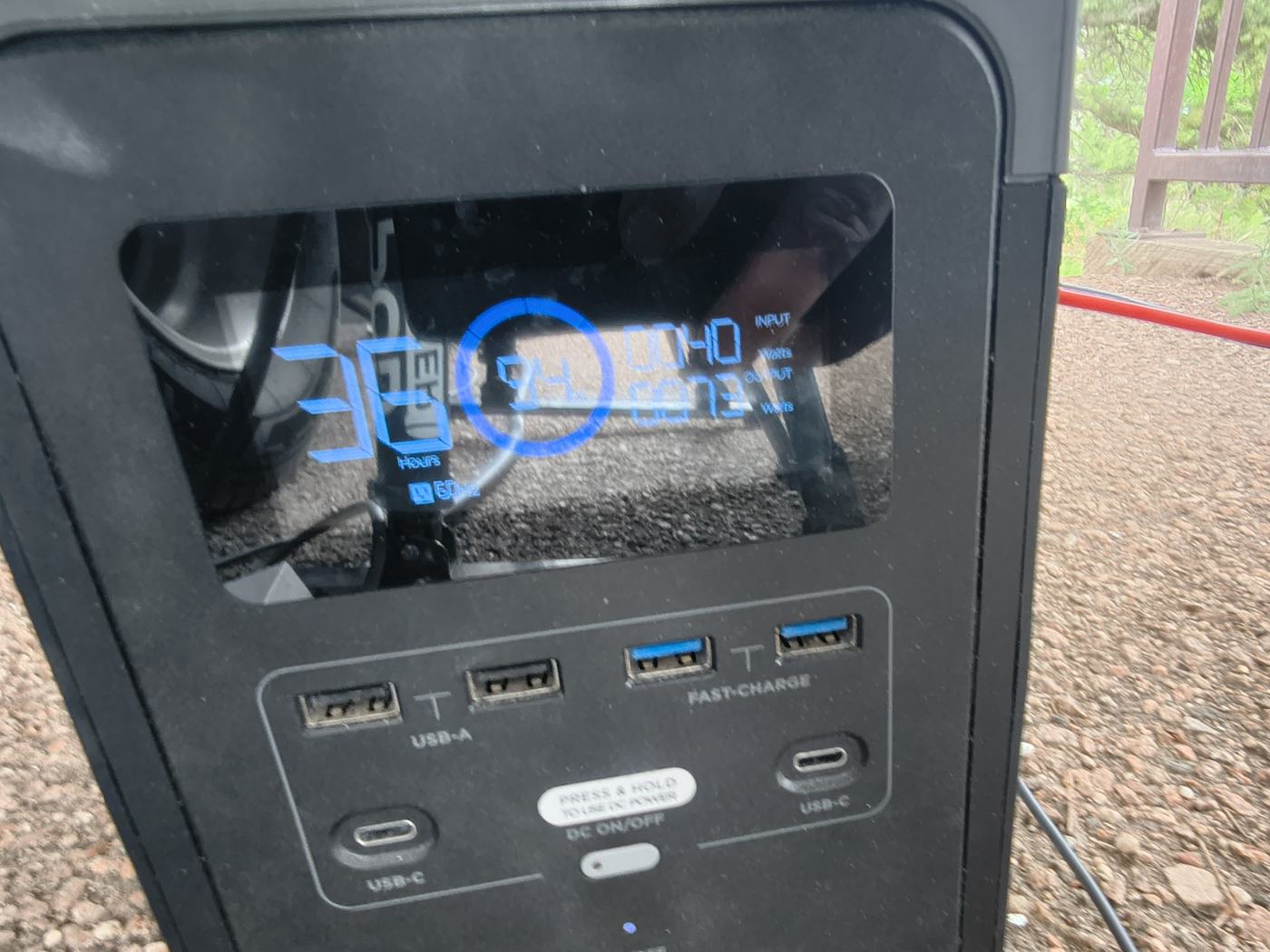
That 73 watts is Starlink plus whatever else is riding the same output, not the dish in total isolation, but it lines up with the published range. It's a small, steady draw, the kind that's easy to plan a battery around once you know the number. That's the same power station I've been running for a while now, and if you want to price one out for yourself, EcoFlow's referral page gets you a discount on the same lineup.
What that means for battery sizing
- Just Starlink, no laptop: at roughly 60 watts average, a 600Wh power station gives you about 10 hours of runtime.
- Starlink plus a laptop (about 125W combined): the same 600Wh station gives you closer to 4 to 5 hours, which is why I run a bigger pack for a full workday (I'm wiring a Pecron F3000LFP for that longer runtime).
- A full day of Starlink running continuously (roughly 1 to 1.5 kWh): you want 1,000Wh or more of storage if you're not recharging from solar or a generator partway through.
Work through those numbers against your own dish. A Mini running at 30 watts average sips a 600Wh station down over roughly 18 to 20 hours by itself, which is exactly why people running lean setups gravitate toward it. A High Performance dish pulling 130 watts average chews through the same 600Wh in under 5 hours, so that hardware wants a bigger bank or a charging source running alongside it, not a standalone battery.
I go through my own full battery stack, house batteries, the portable pack, and the generator that refills both, in You Don't Need Shore Power. If you're sizing solar specifically to keep Starlink running, the watt-hours math is in How Much Solar Do I Need to Work From My RV?, and if you want the fuel side of the equation for a generator-backed setup, I ran those numbers in Generator Math. For a battery-only setup on the road, see Starlink Backup for RV. My full gear list, including the power station in the photo above, is on the setup page.
Why the number matters more than people think
Starlink's wattage isn't just a runtime question, it's also the reason unstable power causes reboots. I run mine through a battery buffer specifically because generators and RV electrical systems are messier than the dish's modest, steady draw expects. A LiFePO4 house bank, something like Battle Born's 100Ah line, is a common way to build that buffer if you don't already have one. If you're wondering whether that buffer is really necessary, I answer that directly in Does Starlink Need a UPS or Battery Backup?
Shop the gear in this article
- Power station in the photo: EcoFlow, linked above.
- Bigger full-workday pack: Pecron F3000LFP, linked above.
- House bank: Battle Born 100Ah, linked above.
- Starlink hardware itself: price it out with my Starlink referral →
Full kit: My RV Setup.
Frequently asked questions
How many watts does Starlink use?
It depends on the dish. The standard actuated dish draws roughly 50 to 75 watts active and about 20 watts idle. Standard 4/4X models run closer to 75 to 100 watts. The Mini draws the least, 20 to 40 watts. High Performance dishes run heaviest, 110 to 150 watts.
How much power does Starlink use per day?
Over a full day of continuous use, the standard dish works out to roughly 1 to 1.5 kilowatt-hours, depending on the model and how much the dish has to work.
Does cold weather increase Starlink's power draw?
Yes. The dish has a heating function that clears snow and ice, and that heater draws meaningfully more power than normal operation. It's not a constant draw, it cycles on when the dish needs it.
What size battery do I need to run Starlink?
For just Starlink at roughly 60 watts average, a 600Wh power station gives about 10 hours of runtime. Add a laptop (about 125W combined) and that drops to 4 to 5 hours. For a full day of continuous use, 1,000Wh or more is a safer buffer without solar or generator recharging.